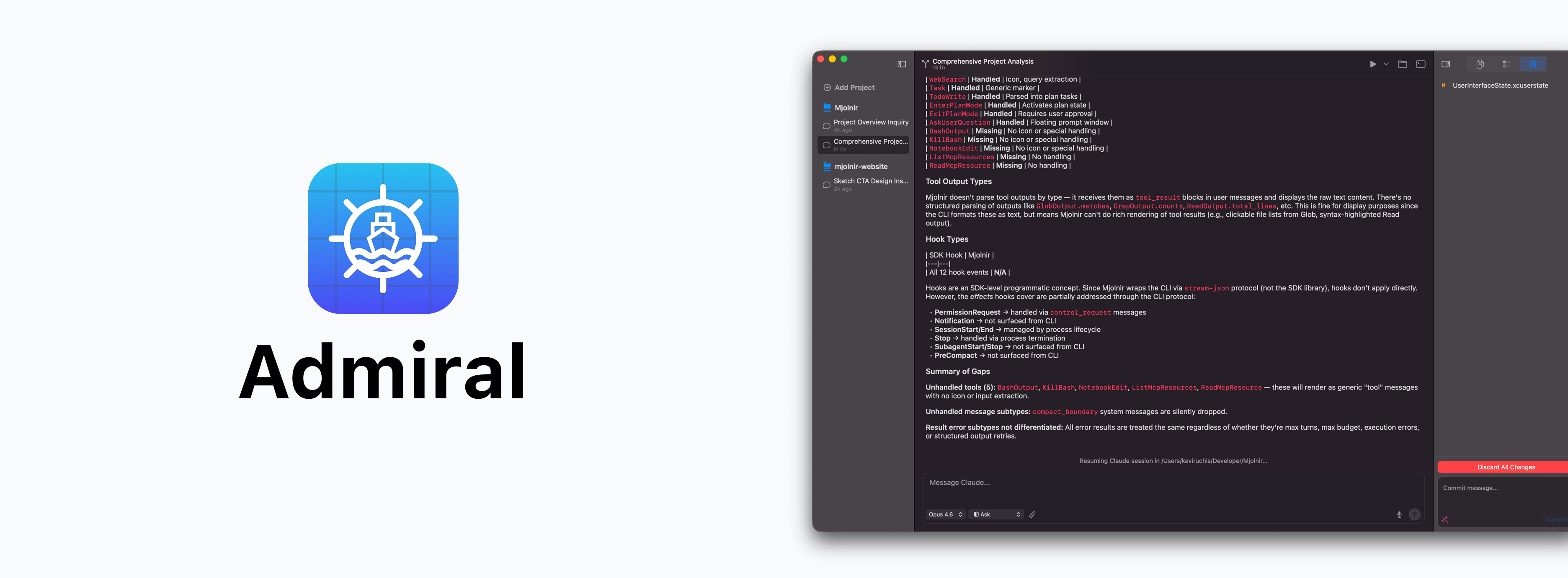
Admiral AI: A native macOS desktop client for Claude Code
Overview
Admiral AI is a macOS-native desktop client that wraps the Claude Code CLI in a polished, IDE-style interface. It gives developers the power to run multiple AI conversations per project, manage files and git operations visually, and let Claude continue processing in the background while they focus on other work.
Rather than forcing developers to stay locked into a single terminal session, Admiral provides a full workspace experience. Multiple chats live side by side, each operating independently, and the app surfaces notifications when background conversations need attention.
The Problem
Working with Claude Code through the terminal is powerful, but comes with friction:
- Only one conversation runs at a time per terminal window
- Switching between projects and conversations requires manual context juggling
- Git operations happen in a separate workflow from AI-assisted coding
- There is no way to monitor background conversations or approve permissions visually
- Terminal output lacks structure, making it hard to parse tool invocations and results
Developers who rely heavily on Claude Code need a dedicated workspace that organizes their AI-assisted workflow, not just another terminal tab.
The Goal
Admiral AI was built with a clear purpose:
Give developers a native macOS workspace where Claude Code feels like a first-class IDE companion, not a CLI afterthought.
To accomplish this, Admiral needed to:
- Support multiple concurrent chat sessions per project
- Provide visual git integration alongside AI conversations
- Surface permission requests and notifications without blocking other work
- Render rich output (Markdown, ANSI codes, tool cards) in a native interface
- Feel fast, lightweight, and deeply integrated with macOS
The Solution
Admiral AI is a three-panel workspace built entirely with Swift using a hybrid AppKit + SwiftUI architecture. It wraps the Claude Code CLI via subprocess management, translating raw JSON events into a structured, visual experience.
The app treats each chat session as an independent unit with its own process, history, and state. A central session manager coordinates lifecycle events, ensuring that switching between chats is instant and that background conversations keep running.
Core Features
Multi-Chat Sessions
Run multiple independent conversations per project. Each chat maintains its own Claude Code process, history, and context. Switch between them instantly without losing progress.
Three-Panel Workspace
A split-view layout with a collapsible sidebar for project and chat navigation, a central chat panel for conversations, and an inspector panel for files, git status, and task plans.
Git Integration
View branch status, browse staged and unstaged diffs, generate AI-powered commit titles, discard changes, and push to remote. All from a dedicated panel within the same window as your AI conversations.
Smart Permission Flow
When Claude requests permission to run a tool, Admiral surfaces the request as a native sheet or floating window. Developers can approve once or for the entire session, with full visibility into what tool is being invoked and with what parameters.
File Inspector
Browse your project’s directory tree, view modified files, and open a side-by-side diff viewer. The inspector stays in sync with git status so you always know what has changed.
Rich Terminal Rendering
Full ANSI escape code parsing brings colored terminal output into a native view. An integrated terminal panel supports direct command execution alongside AI conversations.
Subagent Visualization
Claude’s tool invocations appear as collapsible cards with live status indicators. Each card shows the tool name, parameters, and output, making complex multi-step operations easy to follow.
Background Notifications
When a background chat needs attention (a permission request, a question, or a completed task) Admiral delivers a macOS system notification. No more switching tabs to check if Claude is done.
Voice Dictation
Built-in speech input via macOS dictation APIs. Speak your prompts instead of typing them.
Session Import
Import existing sessions from Claude Code and Codex JSONL files. Pick up where you left off without starting over.
Technical Architecture
Admiral AI is built with Swift targeting macOS 15.0+, using a hybrid approach that combines AppKit for window management and layout with SwiftUI for modern UI components. Data persistence uses SwiftData for local storage.
Key architectural decisions:
- Pluggable agent system. A universal
AgentAdapterprotocol abstracts the AI backend, withClaudeAdapteras the current implementation. This makes it straightforward to add support for other AI agents in the future. - Session management. A singleton
SessionManagerowns all per-chat services. Chat views attach and detach from sessions, with callbacks buffered and replayed when switching back to a backgrounded conversation. - PTY subprocess management. Claude Code runs via
posix_spawnwith pseudo-terminal support, enabling full terminal emulation and streaming event parsing. - Local-first persistence. All project and chat data lives on the user’s machine with no cloud dependency.
- Auto-updates. Sparkle 2 integration with EdDSA-signed updates keeps the app current without manual downloads.
Design Philosophy
Admiral AI follows macOS platform conventions closely:
- Native materials.
NSVisualEffectViewprovides the translucent sidebar and inspector backgrounds that macOS users expect. - System colors and typography. The app uses system semantic colors (
labelColor,separatorColor) and SF Symbols throughout, ensuring it adapts to Light, Dark, and system appearance modes automatically. - Keyboard-first interactions. Permission approvals, chat switching, and common actions all have keyboard shortcuts.
- Minimal chrome. The interface stays out of the way. Information density is high, but clutter is low.
Why It Matters
AI-assisted development is becoming central to how software gets built. But the tooling around it has not kept pace. Most AI coding assistants live inside terminals or browser tabs, disconnected from the rest of a developer’s workflow.
Admiral AI bridges that gap by embedding Claude Code into a native macOS workspace that developers already know how to use. It treats AI conversations as first-class project artifacts, not throwaway terminal sessions.
The result: developers spend less time managing their tools and more time building.
The Outcome
Admiral AI transforms the Claude Code experience from a single-threaded CLI interaction into a full multi-session workspace. Developers can:
- Run parallel conversations across different parts of a codebase
- Review and approve permissions without switching contexts
- Track git changes and AI-generated modifications in one place
- Stay informed about background work through native notifications
- Import and continue previous sessions seamlessly
It is the desktop client that Claude Code deserves.
What’s Next
Admiral AI continues to evolve with:
- Expanded support for additional AI agent backends
- Collaboration features for team-based AI workflows
- Deeper Xcode integration and project awareness
- Advanced session management with branching and merging conversations
- Plugin system for extending functionality
The long-term vision: make AI-assisted development feel as natural and integrated as the rest of the macOS developer experience.